
Welcome to Mystic Network's wiki! We’re excited to help you get started & enjoy everything our community has to offer.
Mystic Network is a Minecraft: Java Edition 1.21.8 server, and the IP is play.mnmc.eu. How to connect?
Our community was founded in early 2020, with one simple goal – standing out as a truly unique Minecraft community, friendly and relaxed, but safe and suitable for players of all ages (10+).
Over the years, our team has dedicated countless hours to creating the Custom Survival experience. Mystic is more than just a server – it’s a growing community of skilled and passionate people, all working together to deliver unlimited fun to our players.
We’re a community-oriented network. Here, players define their own goals and shape the world around them.
Our philosophy is simple – we don’t interfere with your gameplay, and we ask everyone to respect that approach. Griefing and stealing are strictly forbidden, and fighting is also restricted by default.
Mystic is all about cooperation, friendship, and building something great – together!
We recommend checking out our Getting started guide if you want to learn more about gameplay experience.
Coming soon!
To join Mystic Network on Minecraft: Java Edition 1.21.8, follow these easy steps:
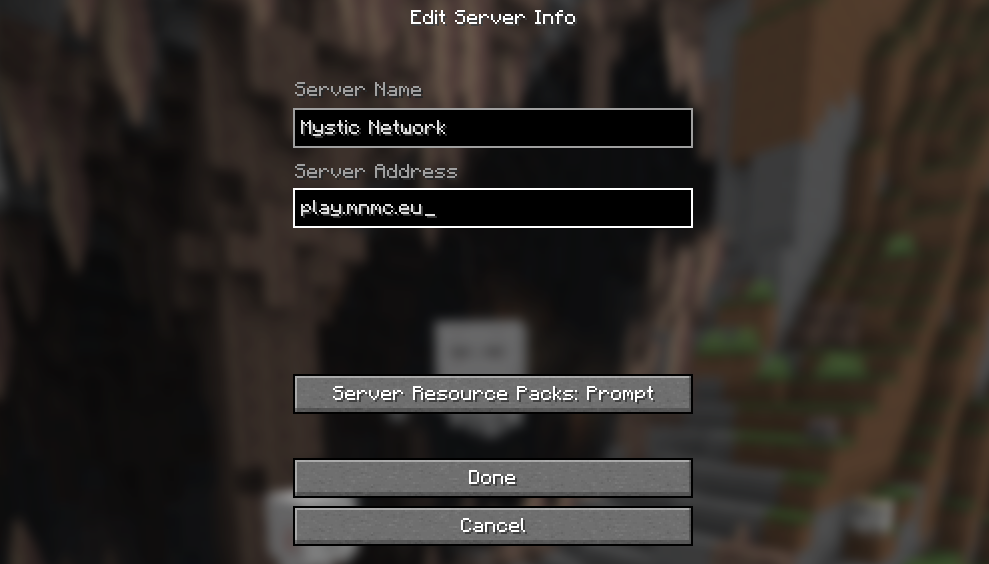
If your account is offline mode, you will have to register it when you join for the first time:
WARNING: Please do not use the same password on other servers! You can get your account stolen!
If you have trouble joining the server or registering your account, please create a ticket on our Discord.
Unfortunately, we do not support Minecraft: Bedrock Edition, as it's a completely different game. We're working hard to make it compatible, but there are still some technical limitations preventing that.
We support both online (premium) and offline mode accounts. We don't encourage playing in offline mode, but we do not restrict it. However, the only launchers we officially support are the official Minecraft launcher or Mystic Launcher.
Welcome, friend! 👋 You're probably here because you have no clue what Mystic is about. Don't worry – it might seem complicated at first, but it's actually very easy to get started!
As we already stated in the Introduction, there isn't a specific goal you can chase. Instead, you are free to do whatever you feel like doing, as long as it doesn't interfere with other players' experiences. However, this doesn't mean that there aren't some things you'll have to do along the way:
After you join for the first time, you will see the intro cinematic – it explains some basic areas around the Town that you will frequently visit.
After it's finished, you will be awarded the Newbie rank 🎖️, which doesn't sound like much fun (so you'd better go finish your quests).
While in this phase, you will not be able to leave the Town. We have made sure to include quests that are easy to understand. After finishing the quests, you'll hopefully get the hang of what the Town has to offer.
Once you finish your Newbie phase, you will be able to leave the Town and travel to the main world. This world is a place where you can start building your own bases and towns!
Its size is limited to 20,000x20,000 blocks, which encourages players to connect with each other by building bases closer! The friendship and cooperation between players is our main priority.
After travelling, you will quickly start to notice that the world has modified generation:
We have implemented a fully functional Calendar 📅 system in Minecraft!
There is also a realistic Temperature 🌡️ system:
If you've found the right unclaimed place where you'd want to settle, it's now a good time to create your first claim.
Our claim management system is fully explained on the Claiming page.
You'll have to start making money in order to expand your claims, build bigger farms, and unlock better items and perks.
Here are some things you can do to start making money:
The server economy depends on you! The Auction House and Chest Shops allow you to set your own prices and keep the economy running.
Congratulations, you've finished the Getting Started guide! Hopefully it will be enough to get you started. Now is a perfect time to familiarize yourself with other mechanics and start creating something truly beautiful! 🏆
The in-game economy is based on two currencies. One of them is regular Cash, and the other one are Gems.
We are proud to say that our economy fully complies with Minecraft's EULA and Commercial Usage Guidelines! We believe in fair play, not in P2W – spending money won't give you unfair advantage over other players, except extra coolness with cosmetic items!
Please don't spend any money on our webstore if you expect to get unfair advantage and get rich quick. Please do so only if you want to unlock pretty cosmetic items and perks – they will surely make you stand out, and you will greatly support the development of our community as well!
Cash is the main in-game currency used in almost every transaction (and activity):
You can also trade Cash directly with other players using the /pay command.
Gems are a premium, special currency that can be obtained through our Store or by participating in community events.
They are not tradeable between players, and you can spend them in-game by typing /shop:
Farming is one of the core mechanics on our server. It is a great idea to invest your money into creating and expanding your farms. With some basic care, your investment will surely pay off!
This guide will explain only the custom farming mechanics, you can also set up your own vanilla farms the usual way.
To start farming, you'll need to decide what crops you'd want to plant. You can check out all crops by talking to Flora in the Greenhouse, in the town farm. That's where you can also get more info about the sell prices of harvested crops. Depending on the world Season, you can plant the following crops:
There is a small chance your crops will turn into golden crops! If they do, the luck is on your side since they will earn you more money than normal crops.
All farming utilities can be bought in the Barn, by talking to the Farmer. It is located in the town farm. Here are some basic farming utilities:
Farming pots are required for all farms. There are two pot types, Dry and Wet. Planted crops will only grow if your pots are wet, meaning that you'll have to take care of watering your pots.
To start your own farm, purchase at least one Dry Farming Pot and place it anywhere in your claims. You may only plant in claimed areas you own (or have access to)!
The next step is to water your pots and/or add fertilizers. Watering can be done in two ways:
Fertilizers are optional, but they are recommended if you want better or quicker results (therefore more cash). They can only be applied by clicking on empty pots, before you start planting.
There is also a Soil Gadget. You can purchase it and use it to get information about the quality of the soil in your pots. Simply click on your pots and the hologram will show up!
You can't generally plant out-of-season, especially in winter. However, if your planted pots remain unharvested and the world goes into another season (in which your crop can't grow), the pot will quickly dry out. To prevent this, purchase a Greenhouse Block and place it directly above the crop. This will allow you to plant in any season, including winter when no crops can grow!
Farming doesn't come without risks. There is a small, but real chance that a wild crow will fly in and steal your crops! The only way to eliminate this chance is to purchase a Scarecrow, and place it near your crops.
To be expanded.
To be expanded.
To be expanded.
To be expanded.
Most Minecraft servers are listed on voting sites, where their players can vote to help boost the server's visibility among other players. By voting, you help attract more players to our community, and in return, we offer great in-game rewards!
Voting for our server is completely free and takes less than a minute to complete. You may vote once every 24 hours. ⏲️
Please visit our Voting page to see all available websites. Simply click on the button for each website, enter your in-game name, and if required, complete the captcha. Shortly after, you should receive your rewards in-game!
Currently, the reward is 1x Common Crate key 🗝️ per website. If you vote on all four websites, you will receive four FREE keys every 24 hours!
You can use these keys to open the Common Crate, or even save them and exchange for any other crate key (even the paid ones), completely free of charge!
Need assistance? Our staff team is available to answer all your questions and provide help. In most cases, you will have to create a new ticket in our Discord server. You can also get assistance in-game, simply @mention an online staff member, or send them a private message.
If you're reporting a rule violation, please ensure that your inquiry requires intervention as per our Rules.
As stated above, the best way to get support is by creating a new ticket on our Discord server. If your issue or question doesn't require intervention from the staff, you can ask in-game or post your question in our community help channel.
To get started, all you need is a valid Discord account, and you must join our Discord server.
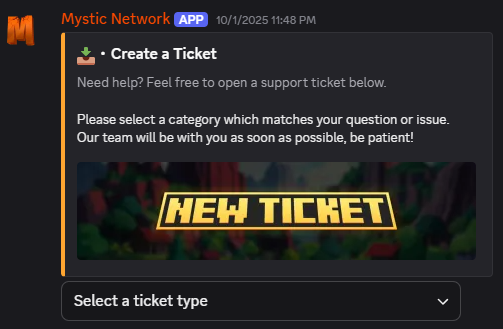
This will open a menu where you can briefly describe your issue, along with some other required information. After that, you will be able to continue chatting with our support as long as the ticket remains open.
Please include as many images and, preferably, videos as possible that can help us understand your question or issue.
⚠️ Please remain patient until we respond! Our staff members are also human. They might not be always online.
In case you don't have a Discord account (and for some reason you don't wish to create it), you can try to get support in-game. Please note that our staff might not be able to help you with every issue in-game, it's always best practice to create a new ticket on Discord.
Mystic Launcher is a custom Minecraft: Java Edition launcher, developed by KFX Development for Mystic Network.
This wiki page will be expanded with more information after the launcher is publicly released, come back soon!